1
BROWSER
Producer Write Connection
Your browser's heartbeat producers being added below will send events here.
Not Connected
Stateful Stream Processing demonstration with Fabric Spark.
Uses Fabric RTI EventStreams, Spark Structured Streaming with RocksDB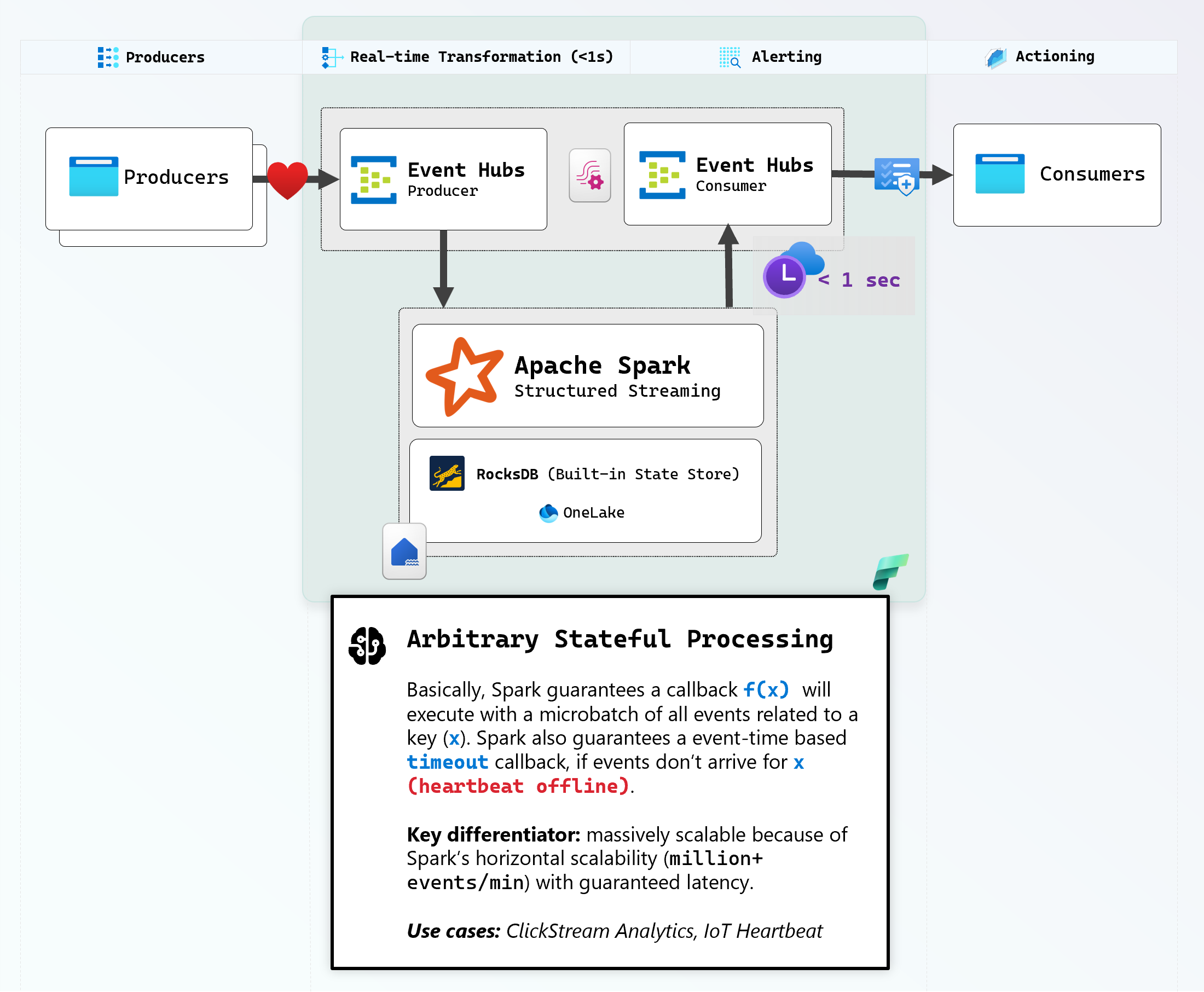
Install the Fabric Jumpstart to deploy the EventStreams, Lakehouse and Notebook into your workspace. Run the notebook to get the 4 connection strings.
python -m venv .venv.venv\Scripts\Activate.ps1pip install git+https://github.com/microsoft/fabric-jumpstart.git@main#subdirectory=src/fabric_jumpstart$env:FABRIC_JUMPSTART_TOKEN_CREDENTIAL = "AzureCliCredential"$wsId = Read-Host "Enter your Fabric Workspace ID"python -c "import fabric_jumpstart as js; js.install('stateful-streaming-rocksdb', workspace_id='$wsId', unattended=True)"
Once the jumpstart deploys, browse to the Fabric UI.
Run heartbeat_notebook from the Fabric UI, and copy the 4 connection strings it prints into the fields below. Spark will read the Event Stream and mark the device as healthy. If the device disconnects for 5 seconds, Spark immediately marks it as unhealthy.
Paste the 4 connection strings from the notebook output below. This is a static website with no backend server, all connections will be established without leaving your browser.
Your browser's heartbeat producers being added below will send events here.
Spark will read the heartbeats from the browser producers from here.
Spark writes the computed health state here.
Your browser reads the processed health state from here.
This named heartbeat producer will send Events to EventStream.
Real-time health monitoring powered by Spark. Events only appear when state changes.
Scroll up to pause producers to watch them go unhealthy when heartbeat times out in RocksDB after 5 seconds. Restart to watch them initialize and go to healthy.
Note that Spark Streaming must always have one event arriving to progress the microbatch, so don't pause all producers!